Agent Models
Intelligent combinations of multiple LLM models optimized for specific use cases with automatic routing for optimal performance.
Link AI doesn't use typical individual models. Instead, we use agent models—intelligent combinations of multiple LLM models from different providers, optimized for specific use cases. Each agent model intelligently routes requests to the best underlying LLM model based on the task, ensuring optimal performance, speed, and cost-effectiveness.
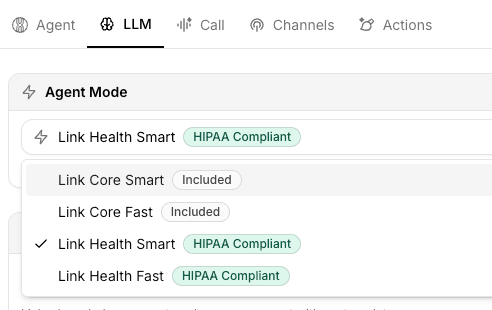
Available Agent Models
Link Core Smart Optimized for complex reasoning and accuracy. Uses a mix of advanced LLM models to handle nuanced questions and provide high-quality responses. Best for use cases where accuracy and thoughtful responses are critical.
Link Core Fast Designed for speed and efficiency. Leverages a combination of fast LLM models to deliver quick responses while maintaining quality. Ideal for high-volume conversations and real-time interactions.
Link Health Smart HIPAA-compliant agent model optimized for healthcare applications. Uses a carefully selected mix of LLM models that meet healthcare compliance requirements while delivering accurate, thoughtful responses for medical and health-related use cases.
Link Health Fast HIPAA-compliant agent model optimized for fast healthcare interactions. Combines speed-focused LLM models with healthcare compliance to deliver quick responses for high-volume medical conversations.
Agent Model Selection Guide
Choose Link Core Smart When:
- Response accuracy is critical
- You need complex reasoning capabilities
- Quality is more important than speed
- You're handling nuanced or complex queries
Choose Link Core Fast When:
- You need fast responses
- You have high conversation volume
- Speed is a priority
- Standard accuracy is sufficient for your use case
Choose Link Health Smart When:
- You're in the healthcare industry
- HIPAA compliance is required
- You need accurate, thoughtful responses
- Quality is more important than speed
Choose Link Health Fast When:
- You're in the healthcare industry
- HIPAA compliance is required
- You need fast responses
- You have high-volume healthcare conversations
Agent Model Configuration
Selecting an Agent Model
- Navigate to your agent's configuration
- Go to the Models section
- Select your desired agent model from the dropdown
- Save your changes
The agent model you select will automatically use the optimal mix of underlying LLM models for each request, ensuring the best performance for your specific use case.
Temperature Settings Temperature controls response randomness:
- 0.1-0.3: Focused, deterministic responses. Best for factual information.
- 0.5-0.7: Balanced creativity and consistency. Recommended for most cases.
- 0.8-1.0: More creative and varied. Use only when creativity is needed.
Token Limits Configure maximum tokens for:
- Prompt tokens: How much context your agent considers (typically 4,000-8,000)
- Completion tokens: Maximum response length (typically 1,000-2,000)
Higher limits allow more context and longer responses but increase costs.
Agent Model Performance
Response Quality Each agent model is optimized for different quality profiles:
- Link Core Smart: Highest quality and reasoning capabilities
- Link Core Fast: Good quality optimized for speed
- Link Health Smart: High quality with healthcare compliance
- Link Health Fast: Good quality optimized for fast healthcare interactions
Response Speed Agent models are optimized for different speed requirements:
- Link Core Fast: Fastest responses
- Link Health Fast: Fast healthcare responses
- Link Core Smart: Moderate speed, optimized for quality
- Link Health Smart: Moderate speed, optimized for quality and compliance
Cost Considerations Agent models intelligently route requests to optimize costs while maintaining performance. The underlying mix of LLM models ensures cost-effectiveness for your specific use case and conversation volume.
Optimizing Agent Model Usage
Prompt Engineering Well-crafted prompts improve performance with any agent model:
- Be specific about what you want
- Provide clear examples
- Set appropriate boundaries
- Include relevant context
Knowledge Base A comprehensive knowledge base reduces the need for the agent model to generate information, improving accuracy and optimizing costs.
Token Management Agent models automatically optimize token usage, but you can still configure limits:
- Keep prompts concise but complete
- Set appropriate completion limits
- Monitor token usage in analytics
- Adjust limits based on actual usage
Temperature Tuning Adjust temperature based on your needs:
- Lower for factual, consistent responses
- Medium for balanced performance
- Higher only when creativity is needed
Testing Agent Models
Compare Agent Models Test different agent models with the same queries:
- Create test queries representative of customer questions
- Test each agent model with the same queries
- Compare response quality, speed, and cost
- Select the agent model that best fits your needs
Monitor Performance Track metrics for your selected agent model:
- Response quality (customer satisfaction)
- Response time
- Token usage and costs
- Error rates
Iterate Based on Data Use analytics to identify areas for improvement:
- Switch agent models if quality is insufficient
- Adjust temperature if responses are too random or too rigid
- Modify token limits based on actual usage patterns
Best Practices
Start with Link Core Fast Begin with Link Core Fast for most use cases. It provides good quality at optimal cost and speed. Upgrade to Link Core Smart only if you need better accuracy and reasoning.
Test Before Switching Always test a new agent model thoroughly before deploying to production. Verify it meets your quality and performance requirements.
Optimize Prompts Invest time in prompt engineering. A well-crafted prompt improves performance with any agent model more than switching models.
Consider Use Case Different agent models excel at different tasks. Choose based on your specific needs—whether you prioritize speed, quality, or healthcare compliance.
Troubleshooting
Poor Response Quality
- Try a different agent model (e.g., switch from Link Core Fast to Link Core Smart)
- Improve your system prompt
- Add more content to your knowledge base
- Adjust temperature settings
Slow Responses
- Switch to a faster agent model (e.g., Link Core Fast or Link Health Fast)
- Reduce completion token limits
- Optimize your prompt to be more concise
- Check for network or API issues
Next Steps
Learn how to configure your agent's Knowledge Base and Actions to maximize your model's effectiveness.