Work
Inbox
Review every call and message from every channel in one place, and take over any conversation from your agent.
The Inbox holds every conversation your agents have, across calls and every channel, in one list. Use it to review what your agent said, step in when a customer needs a person, and export threads for QA.
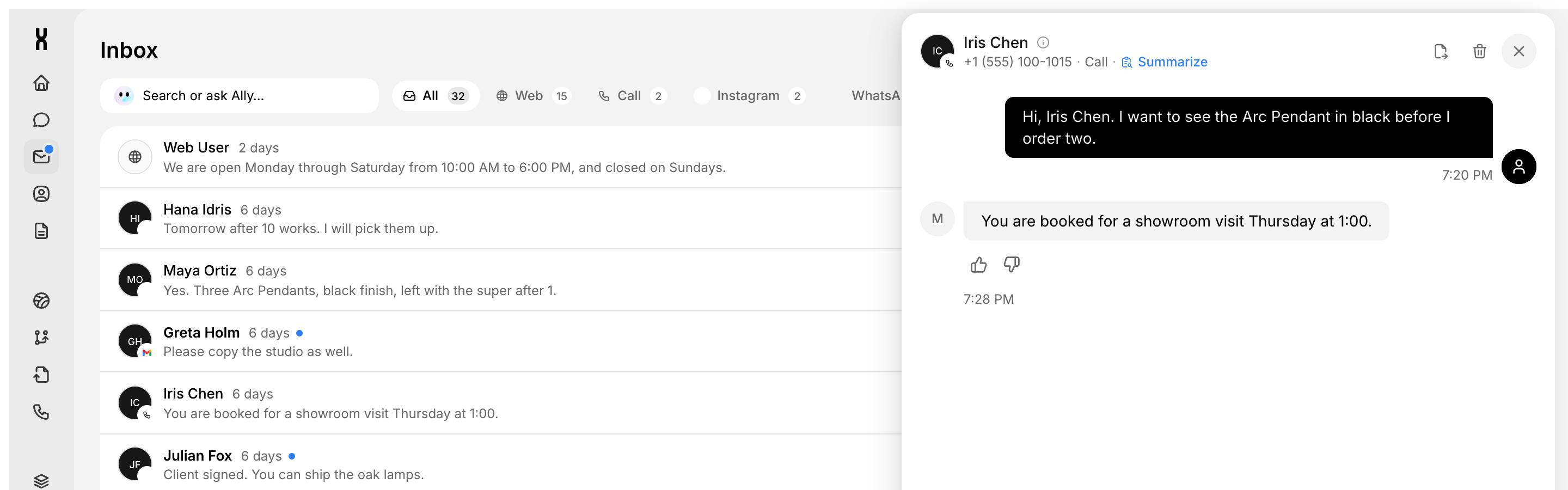
What lands in the Inbox
Each conversation becomes a thread, whatever the channel:
SMS threads appear once a phone number is assigned to the agent on the Call tab.
Find a conversation
The tabs across the top filter by channel and show how many threads each one has: All, Web, Call, Instagram, WhatsApp, Messenger, Slack, Gmail, Outlook, and more as you connect them.
- Search or ask Ally finds a thread by name or content, or lets you ask Ally a question about your conversations.
- Select lets you act on several threads at once.
- New starts a conversation.
Open a thread to see the contact, the channel, and the full message and tool timeline. Tags such as Calendar or Orders show which actions the agent used. Click Summarize in the thread header for a quick recap.
Take over a conversation
Step in when a customer needs a person. Takeover is per conversation, so other threads keep using the agent.
Takeover works on chat, WhatsApp, Instagram, Messenger, SMS, Outlook, and calls.
Review calls
Every phone call creates a thread with source Call, with caller info and a live transcript. When recording is on, the thread includes a player with:
- A waveform synced to the conversation, with segments for caller, agent, and agent actions.
- Playback speed: 1x, 1.25x, 1.5x, and 2x.
- Download and delete. Deleting a recording keeps the transcript.
A warning appears when a recording is within 7 days of expiry. Retention depends on your plan. See Phone.
Rate agent replies
Give any agent reply a thumbs up or thumbs down, with an optional comment up to 500 characters. Use feedback to flag weak answers and improve your prompt over time.
Export a conversation
Click Export in the thread header to download a JSON file with:
- Thread and contact metadata.
- The full message and tool timeline.
- Voice session details, like duration, numbers, and recording status.
- Feedback ratings and comments.